FCBKcomplete v 1.09
Posted on 25. Mar, 2009 by admin in ASP.NET, Facebook, Featured Articles, Javascript, Jquery, Pro Counter
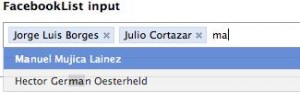
Fancy facebook-like dynamic inputs with auto complete & pre added values. If you have any comments or requests, please post them and I will try to include all the requested features in the upcoming release.
New version of FCBKcomplete can be found here
Download: Download FCBKcomplete
Demo: Demo FCBKcomplete
Use:
<script language="JavaScript">
$(document).ready(function() {
$.facebooklist('#elem', '#list', '#complete',{url:'ajax-url',cache:1}, height, {userfilter:1,casesensetive:0});
});
</script>
* This source code was highlighted with Source Code Highlighter.
elem – input element id or object
list – preadded elements
complete – autocomplete div id or object
ajax – object with two parametrs a) url to fetch json object b) use cache
height – maximum number of element shown before scroll will apear
filter – object with two parametrs a)case sensitive b) show/hide filtered items
newel – show typed text like a element
Creditrs for CSS & HTML structure: Guillermo (http://devthought.com)
Updates:
- 1.09 IE crash fixed
- 1.08 some minor bug fixed
-1.07 case sensetive added
applied filter to non ajax items
filter algorithm changed
cache for ajax request added
up/down with auto scrolling
minor code fixes
- 1.06 auto heigth fix
event bind on main element for better user frendly experience
filter for items
up/down keys supported from now
- 1.05 bindEvents function fixed thanks to idgnarn
- Name changed to FCBKcomplete
- 1.04 IE7 <em> tag replace fixed
- 1.03 IE7 & IE6 crash fixed
IE7 css fixed
- 1.02 json parsing fixed
remove element fixed
- 1.01: some bugs fixed

100 Comments
John Farrar
01. Oct, 2008
Had client try this out and his IE instances crashed. May not have been this… but thought would check.
Paul irish
02. Oct, 2008
For google’s sake I’ll mention the keywords that this would usually be found under:
jquery facebook autocomplete
(i’d recommend you rename it/the post something similar…
Ab
02. Oct, 2008
Hello
Very nice script …
I think that this can be used inside a form … but if we do … what hapend if we submit … is there a possibility to transmit the data to an other page via à POST or GET …
Best ragrads
admin
02. Oct, 2008
to John Farrar:
In what IE version?
to Paul irish:
I believe that I cant mantion “facebook” word.
to Ab:
You can put it to your form and decide in which way you want to send data.
Csaba
03. Oct, 2008
I tried it in IE6 and it crashed
tamizh
04. Oct, 2008
Hello
Nice Script,
But this is not worked in IE7.
Lefteris Koumis
04. Oct, 2008
it crashes on my pc too. i run it on IE 7.
admin
04. Oct, 2008
to Csaba, tamizh, Lefteris
Fixed.
tamizh
04. Oct, 2008
Hello,
Now i am checking IE7.But Still demo is not working in my browser.Where is the updated Script?
admin
04. Oct, 2008
to tamizh:
Sorry uploaded wrong files
tamizh
04. Oct, 2008
hai,
Now work very fine..
thanks.It really nice script.I have searched most of autocompletion scripts but this one is very comfortable for all.
one suggesstion in string replace
var title=item.html().replace(’‘,”).replace(’‘,”).replace(’‘,”).replace(’‘,”);
because in IE was not replaced.
):
tamizh
04. Oct, 2008
hai,
Now work very fine..
thanks.It really nice script.I have searched most of autocompletion scripts but this one is very comfortable for all.
one suggesstion in string replace
var title=item.html().replace(’‘,”).replace(’‘,”).replace(’‘,”).replace(’‘,”);
because in IE,It was not replaced.
):
tamizh
04. Oct, 2008
var title=item.html().replace(,”).replace(,”).replace(,”).replace(,”);
tamizh
04. Oct, 2008
sorry ,
suggestion for em replace.that em tag is not shown in previous thread.
need to replace EM and em.
thanks
kareem hassan
04. Oct, 2008
dear all,
this script is only get 3 value,
and i can’t get more record
also its not working on IE7
its working fine on Mozilla Firefox
there is any advise
kareem
matsdn.com » Blog Archive » Jquery multiselect
05. Oct, 2008
[...] Jquery multiselect is a textbox list with autocomplete using the jquery library. It’s an easy to use plugin! [...]
admin
05. Oct, 2008
to kareem hassan:
Strange cause I tested this script on Vista with Ie6& IE7 and all worked well.
And what about 3 can you be more specific???
redsquare
06. Oct, 2008
Should I be able to see the text that I type as part of the autocomplete list and actually select it??
admin
07. Oct, 2008
to redsquare:
Yes, in next version I will add new control that will add abbility to disable this.
GreenAlgae
14. Oct, 2008
The EM tag is not replaced correct in IE, I suggest the following change in line 45:
item.html().replace(//i,”).replace(//i,”);
GreenAlgae
14. Oct, 2008
hmmh, it does not display the code correctly, the point is to use a case-insensitive regular expression instead of a normal string.
Múltiplo select combinado com suggest
22. Oct, 2008
[...] http://www.emposha.com/upload/jquerymultiselect1_0_3.zip Fonte: http://www.emposha.com/javascript/jquery/jquerymultiselect.html Dicas, [...]
JETM
26. Oct, 2008
I’m using the newest/demo version and in still IE7 don’t work fine.
When choice a element show me Manuel Mujica Lainez and the code in HTML M<EM>a</EM>nuel Mujica Lainez.
Any suggestions/idea to fix it?
admin
27. Oct, 2008
JETM & GreenAlgae: fixed
Simone D’Amico » Blog Archive » Simone D’Amico
31. Oct, 2008
[...] | emposha.com posted under jQuery, [...]
Marco
04. Nov, 2008
I think you should at least give some credits to Guillermo (http://devthought.com) since you ported his idea to jQuery (btw. there is another and smaller one over here: h**p://www.bigredswitch.com/blog/2008/10/jquery-dynamic-textboxlist/) and even used the same example names!
admin
04. Nov, 2008
to Marco: credits added thanks, about smaller check sizes of js files again
matias
10. Nov, 2008
How can i send data in a form?
if i put a submit button i cant receive anything…
matias
10. Nov, 2008
Forget my previous message
it’s monday in the morning hehe
Nette Geniş Bilgi Kaynağı » Multi Select Çoklu Seçmeli Menü
12. Nov, 2008
[...] birini seçince kutunun içerisine otomatik ekleniyor. Hoş değil mi? Uygulamanın sitesine buradan ulaşabilirsiniz. Uygulamyı bizim sitemizde buradan bakabilir, zip olarak da buradan [...]
Tor
25. Nov, 2008
Hey
How do i set that the li element in #feed to only show captions that really have the letters i type in the input.maininput.
This is a very nice script but i dont want too show all my values in the li list.
Alexandre
25. Nov, 2008
Hello all,
I would like to know how do we put the focus() on the element ? I have tried with the default name, but it does not work.
Thanks all
Jquery! MultiSelect
28. Nov, 2008
[...] click here to see the complete example [...]
admin
28. Nov, 2008
@Tor: This kind of functionality better impelment in server side script language.
@Alexandre: $(”#elementid”).focus();
Andrew Coleman
10. Dec, 2008
Hey, i want to use this with Packer, and here is a small patch to do that. You need some semicolons ending function definitions, that’s all.
http://pastie.org/335561
Andrisi
31. Dec, 2008
Hi! Looks very nice, but when I type “Manuel” in the demo, it does not filter the dropdown list, so I see one Manuel in the 2nd row, but the other is not visible in the dropdown, because it’s around the 10th. Or ther’s a setting for this? Also maybe you could change in to be case insensitive. I’ll look into it. It would be nice to navigate the dropdown with the up and down keys, and also if after adding an item, the cursor (focus) would remain in the textarea. I know it’s a free component, and I have to stop complaining and giving ideas… Anyway, happy new year!
Njau Ndirangu
12. Jan, 2009
How do you incorporate Mysql in this to fetch the array?
webosb
16. Jan, 2009
you should turn this into a wordpress plugin (for the search box)
Zach Leatherman
16. Jan, 2009
Good start!
I believe that standard autocomplete should include keyboard support. At minimum, up and down arrows, with selection occurring when you press the enter key.
William
16. Jan, 2009
Might I suggest having the plugin add a click handler to the ‘ul.holder’ element, that puts focus on the border-less input? It would be reasonable for a user to expect clicking at the end of the “text input” to bring it into focus and add an input cursor, but if the ‘.bit-box’ elements are wide enough to cause the input to overflow to the next line, it becomes difficult to tell how to input more names. I think this is the issue kareem hassan was reporting.
To make it even fancier, instead of using margin-right to space a ‘.bit-box’, you could try inserting an empty LI tag with the same width as the margin, and attaching a click handler to that which will insert-and-focus a new border-less, size-1, auto-expanding text input between names in the list (or at the beginning of the list). And check to see if jQuery.ui.sortable is present, and allow the names to be swapped around if so.
I would try to do it myself, but I already have too much work to do, and probably shouldn’t be spending my time reading blog posts on neat new interface tricks. Thought the ideas worth mentioning though, in case anyone else feels like taking up the challenge.
admin
17. Jan, 2009
@Zach: yep in next update I will include this functionality.
@William: Thanks! I will consider those changes
aery
19. Jan, 2009
In the demo, ‘Type the name of an argentine writer you like’ should disappear when user click somewhere else.
One more thing, I prefer ‘new’ button/link or just empty text field with border after last successful selection. For some user, it may takes some time to figure out how to add new selection/item.
Thanks.
xxx
19. Jan, 2009
case insensitive …
change
if (val.caption.indexOf(input)!= -1) {
to
if (val.caption.toLowerCase().indexOf(input)!= -1) {
Dave
19. Jan, 2009
While cool, this plugin has one huge problem. It relies on server-side code to re-filter the list. Facebook does not. They retrieve a full list of relationships at the start and they do all the auto-complete/search functionality client-side in JS. They only need to go to the server for the initial relationship list.
As a result, FB is *MUCH* faster.
Darren
19. Jan, 2009
I agree. Can this be fixed?
Darren
19. Jan, 2009
What happened to the previous message regarding updating the plugin to not go server-side for every new filter request like Facebook.
Is this possible?
admin
19. Jan, 2009
@ Dave:
@ Darren:
You can add li items to
with php or asp and script automaticly parse them… without going to server…
ps: and dont forget to put null to ajax variable.
@ aery: Thanks Will be fixed in next update.
@ xxx: Thanks. Will be fixed in next update.
Darren
19. Jan, 2009
Thanks. But does it filter the list client-side? E.g. If I have:
Darren
James
Steve
Jacob
Jane
And I enter: Ja
Then only
James
Jacob
Jane
Show up in the list.
Darren Bounds
19. Jan, 2009
While I’m not a UI guy, I’ve added a function to refine result set client-side.
It’s not the prettiest code but it appears to work well and is much faster.
var addItemClientSideList = function(str) {
var rels = $(”#rels”).val().split(”,”);
var result = “”;
var counter = 1;
feed.children(’li[fckb=2]‘).remove();
for(var i in rels) {
var user_data = rels[i].split(”_”);
var name = user_data[0];
var value = user_data[1];
if(name.toLowerCase().match(str)) {
var li = document.createElement(’li’);
$(li).attr({’val’: value,’fckb’: ‘2′});
$(li).html(name);
feed.append(li);
counter++;
}
}
if (counter > height) {
feed.css({’height’:(height*24)+’px’, ‘overflow’:'auto’});
} else {
feed.css(’height’,'auto’);
}
}
admin
20. Jan, 2009
@ Darren: what exectly this function does?
Darren Bounds
21. Jan, 2009
It does this:
1) It only makes it necessary to go to the server for the list once.
2) It then takes that list and re-filters it client-side with each keystroke similarly to how you are now going to the server.
It expects a comma separated list of values in the following format.
some value_some identifier,some other value_some other identifier,…
As I’m sure you’d agree, going to the server just to retrieve a filtered list is not efficient.
Darren Bounds
21. Jan, 2009
BTW, you use it in place of addItemFeed().
Leo
22. Jan, 2009
There is a bug, line 56, when setting the value of the input from the pre-added list item. The script uses item.attr(’val’), which holds the inner text of the li element, while it should be using item.attr(’value’), which will read the real value attribute assigned to the li.
So the line #56 should read:
var value = (item.attr(’value’) && item.attr(’value’) != -1 ? item.attr(’value’):title);
Thanks for a great script, I hope this helps.
Andrisi
25. Jan, 2009
If you get back the maximum number of items for a lookup from the server (for example: bil*, limit 20) as the limit, then you have to ask the server again, when you add anoter char, because some possible items were left out at the first query.
Andrisi
25. Jan, 2009
Also, you have to highlight “Oca” in the menu, if you type “oca” in the field. The cursor still doest not go back to the edit field after adding an item.
Alex
26. Jan, 2009
good script, but a few points:
1. regarding pre-added elements, you should use a select control instead of a list control for 2 reasons:
a. value attribute for li is deprecated in HTML 4.01
b. it causes problems with certain values
to use a select, replace:
if (list && list.children(’li’).length) {
$.each(list.children(’li’), function(i, val) {
addItem($(list.children(’li’)[i]),1);
});
}
with:
if (list && list.children(’option’).length) {
$.each(list.children(’option’), function(i, val) {
addItem($(list.children(’option’)[i]),1);
});
}
2. the script doesn’t properly use the value attribute of the li/select. to correct this, replace:
var value = (item.attr(’val’) && item.attr(’val’) != -1 ?item.attr(’val’):title);
with:
var value = item.val();
admin
29. Jan, 2009
@Leo: fixed
@Andrisi: 1) fixed. 2)Yep I know, working on it.
@Alex: 1) css & structure problems ( hard to implement this logic with css)
2) Work only with proper elements, in my case useless. But thanks for suggestions!!!
Alex
03. Feb, 2009
few more comments:
1. there’s a problem after the user selects a value, then clicks to add another. the autocomplete list is shown, even though a new value hasn’t been typed yet. to prevent this, reset the value before removing it. i.e. put this line:
$(’.maininput’).val(”);
before this line:
holder.removeChild(document.getElementById(’annoninput’));
2. the script doesn’t work when you want to use it multiple times on the same page. it would be very beneficial to have this, as i use it for writing emails with a TO, CC and BCC.
Harry M
04. Feb, 2009
Could you add an option for keyboard support? Highlight the top-most result, and allow tab or return to select the currently highlighted item, up and down to move the highlight up and down.
Also consider instead of a url to get results from, add an option to pass a callback function which returns the results. This way people can also use the code with a local function, instead of just an ajax get.
fridayana
13. Feb, 2009
I am modified this line at fcbkcomplete.min.js line 79
$.getJSON(ajax.url+’?tag=’+etext
to
$.getJSON(ajax.url+’&tag=’+etext
or is there any solution?
REW Mike
13. Feb, 2009
I modified the code to better append the query.
request = ajax.url.indexOf(”?”) ? ajax.url + “&” : ajax.url + “?”;
$.getJSON(request + ‘q=’ + etext, null, function(data){
addItemFeed(data, etext);
cache = data;
bindEvents();
});
i also changed it to use q=. in case anyone needs this.
Tolga
16. Feb, 2009
nice plugin but needs some modifications..
eg..
biggest problem, needs delay parameter. Otherwise, it calls ajax while user types something. If it has some 300-500 ms delay that waiting for the user, then 5-6 ajax calls will be reduced to 1.
also backspace while the hidden textbox is empty, doesn’t erases the latest user. it will be nice to do such as facebook does.
thx..
Mark
18. Feb, 2009
for some reason i cannot get it to submit the value entered or selected from the popup list to the form (via POST).
The code simply won’t update the textbox’s value, rather it will only submit to the form’s default value specified in the input tag.
Does anyone know how to get it to post the chosen value from the list rather than default?
Please let me know any help would be greatly appreciated!
Alan
20. Feb, 2009
the demo is still unworking in IE7. It got crashed.
I got this IE error: ‘console’ is undefined
Niz
21. Feb, 2009
Nice and helpful plugin!
Few suggestions:
1- var feed = $(’#feed’);
is hardcoded. Prevents from having multiple autocompletes on the same page. id should be passed to facebooklist() as a parameter
2- for preadd:
var value = (item.attr(’val’) && item.attr(’val’) != -1 ?item.attr(’val’):title);
should be:
var value = (item.attr(’value’) && item.attr(’value’) != -1 ?item.attr(’value’):title);
to keep consistent html
3- Nice addition of keystrokes for v1.06. Im not sure if onBlur on $(’.maininput’) was fixed but it would be helpful:
maininput.blur(
function()
{
if(nowFocusOn == null)
{
feed.empty();
feed.hide();
}
}
);
Alan
26. Feb, 2009
The crashed issue fixed in IE7 after I change the property name of from “value” to another (”val” or any others are ok)
Alan
26. Feb, 2009
The crashed issue fixed in IE7 after I change the property name of “li” tag from “value” to another (”val” or any others are ok)
Mervyn
26. Feb, 2009
IE crash problem coms from
function addItemFeed … …
if(val.caption){
var li=document.createElement(’li’);
$(li).attr({’value’:val.value,’fckb’:'2′});
1. val might empty object
2. somehow $(li).attr() crash ie
so i rewrite code :
function addItemFeed(data,input){
feed.children(’li[fckb=2]‘).remove();
$.each(data,function(i,val){
try{
if(val.caption){
var li=$(”).attr({’value’:val.value,’fckb’:'2′});
if(feedFilter(li,val.caption,input)){
feed.append(li);counter++;
}
}}catch(e){}
});
defaultFilter(input);
}
Then it works well~
angus
04. Mar, 2009
how to get value via POST method?
Alec Hipshear
04. Mar, 2009
It crashes in IE6 / Windows XP for me. Have not tested in IE7.
On line 294, you left a call to console.log in. This causes errors in IE if you don’t have Firebug Light included, but it is not the cause of the crash – even commenting out this part causes IE to go berserk and hard-fail.
Joel Martinez
05. Mar, 2009
just to add to the list, this causes my IE7/Vista to hard crash as well.
myGameCommunity
06. Mar, 2009
Hi,
thanks for you nice script. We have a small fix regarding case sensitivity.
Actually it only works if the user enters lower case characters.
We fixed this in the feedfilter function around line 150 with this code:
var lowerInput = input.toLowerCase()
if (caption.toLowerCase().indexOf(lowerInput) != -1) {
item.html(caption.replace(new RegExp(”(”+lowerInput+”)”, ‘i’), ‘$1‘));
return true;
}
Luca Barbato
08. Mar, 2009
In the demo there is a strange behaviour regarding case sensitivity if I type “Rob” I do not get Roberto Payro but if I type “rob” I do get it…
Beside that what’s missing is the possibility to bind additional data to the elements (e.g fetch from ajax a array of tuples with some data and have a callback to fill the li element on select and a callback to fill what goes into the selected item once is selected.
Renan Andrade
10. Mar, 2009
Dude, in IE 7 on Vista its crash teh browser. This plugin is great, but if it was fixed it will be the best.
Serhat
13. Mar, 2009
Hi,
thanks for script.. its nice.. but,
it add same name.. ex in the demo : you can add 2 or more Juan L. Ortiz name.. how can it fixes ? if value is the same next name it wont be add new..
btw , ie7 has crash.. i wrote Mervyn’ code but it doesnt change..
Richard
16. Mar, 2009
I’m hearing lots of IE issues but this causes Firefox 3 to crash jquery for me. The json string is returned in milliseconds, what happens after that brings down Firefox
John Beadle
17. Mar, 2009
^ echoing Alec’s comments, this only seems to work for me in Firefox or Chrome, IE7 and IE6 give me a complete browser explosion and crash immediately.
Hope this is resolved as this is the best autocomplete i’ve seen and am very keen to reuse it
thanks in advance
Michael Pardo
18. Mar, 2009
For all those getting an IE crash, this is why. IE doesn’t like the ‘value’ property in the ‘li’ tag. This is no longer valid HTML markup. Change ‘value’ to ‘val’ in the source file wherever ‘value’ is being set for ‘li’ elements. There are two occurrences of this.
The author of this plugin did a great job, but there are a few things that I had to change to make it behave as I expected.
NA
18. Mar, 2009
crashes in ie7 as well
Renata
20. Mar, 2009
I tried use it in Opera 9.63 on Linux but when I pressed any key + ALT (for national characters), it hasn’t worked. It works properly on Windows.
ndrew
20. Mar, 2009
Great script. Thank you. This is *very* close to exactly what I need. Is there any way to specifiy a format function? What I mean is, I have multiple fields per record returned by my server-side script. I want one used for display while another is used for the value.
Is there a way to do this with this script?
Thanks for the help.
Ziggy
21. Mar, 2009
Demo works in IE8 if anyone bothers.
Mikkel W. Breum
23. Mar, 2009
How do I set the newel parameter to true? If I understand it correctly it should enable the option to automatically have whatever is typed into the input appear as a first option in the list (so its possible to add items not already in database), correct?
admin
25. Mar, 2009
IE issue fixed
Akash
25. Mar, 2009
this is really very nice script dear…
let me check it in different browser for proper working..
thnx for the nice script.
frankeyboard
26. Mar, 2009
How can I get the selected values in a asp server-side script?
I tried to send the form with “get” method to my asp page, and this is the QueryString, which is received:
“page.asp?facebook-demo%5B%5D=&facebook-demo%5B%5D=”
I tried also with “post” but the result is the same. No value, only empty string for the variable “facebook-demo[]“…
…yes, the brackets are added to “facebook-demo” field name, I don’t know why.
admin
26. Mar, 2009
Fixed.
ps: sorry my bad!
frankeyboard
26. Mar, 2009
Great job!
Now it works!!!
frankeyboard
27. Mar, 2009
Ooops, another small problem sending the form.
All perfect with the selected item from the list but when I write new values in the text-input theese are not sent to the asp page…
Web and Linux » Blog Archive » jQuery autocomplete plugin. Поля ввода с AJAX drop-down
28. Mar, 2009
[...] представитель FCBKcomplete v 1.09. Как можно догадаться по его названию этот plugin можно [...]
Lazaro
29. Mar, 2009
Hi, i’m very newbie… =/
How i get the values via post?
i try to use the text field name, but its not work…
can help me pls?
thanks!!
frankeyboard
30. Mar, 2009
@Lazaro: You must use the field name followed by square brackets.
For exampel, if the field name is “fAge” you have to read it as “fAge[]”
@admin: any news about my previos post?
admin
30. Mar, 2009
@frankeyboard: Use new version http://www.emposha.com/javascript/fcbkcomplete.html
Jimmy Soho
31. Mar, 2009
After choosing a value from the list I’d like to able to continue entering another name using the keyboard. However, I must first click into the field again.
justin
31. Mar, 2009
I was trying to get running with your script but it seems that every time it completes the ajax request for the data it locks up and freeze firefox to where i have to stop the script from running anymore, this happens eveyrtime on different OS’s.
Is there a way to just give the autocompleter my data NOT from an ajax request?
Designfeed.me » 10 Creative & Rich UI & How to Create Them
31. Mar, 2009
[...] How To » FCBKcomplete v 1.09 [...]
marco
08. Apr, 2009
@frankeyboard, can you please provide an demo on how to post the values, im also a newbie and can’t find a way to submit the values. Thank you.
phongqn2000
25. Apr, 2009
how can I can value from textbox ? It mean I want to post the vaules to the server side
Sarah
27. Apr, 2009
Hi i want to use this code to choose direclty from Mysql Database how could i change it
Thanks for your time and help
Mubarak
21. Jun, 2009
After selecting the contacts the text box loses its focus and you know users are too lazy to click the check box each time they choose the contact
this is the drawback of the script
i request u to fix this bug
Leave a reply