FCBKcomplete v 1.09

FCBKcomplete v 1.09

Posted on 25. Mar, 2009 by emposha in ASP.NET, Facebook, Featured Articles, Javascript, Jquery, Pro Counter

Fancy facebook-like dynamic inputs with auto complete & pre added values. If you have any comments or requests, please post them and I will try to include all the requested features in the upcoming release.
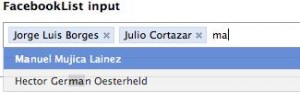
New version of FCBKcomplete can be found here

Download: Download FCBKcomplete

Demo: Demo FCBKcomplete

Use:

<script language="JavaScript">
$(document).ready(function() {
$.facebooklist('#elem', '#list', '#complete',{url:
'ajax-url',cache:1}, height, {userfilter:1,casesensetive:0});
});
</script>

* This source code was highlighted with Source Code Highlighter.

elem – input element id or object
list – preadded elements
complete – autocomplete div id or object
ajax – object with two parametrs a) url to fetch json object b) use cache
height – maximum number of element shown before scroll will apear
filter – object with two parametrs a)case sensitive b) show/hide filtered items
newel – show typed text like a element

Creditrs for CSS & HTML structure: Guillermo (http://devthought.com)

Updates:

- 1.09 IE crash fixed

- 1.08 some minor bug fixed

-1.07  case sensetive added
applied filter to non ajax items
filter algorithm changed
cache for ajax request added
up/down with auto scrolling
minor code fixes

- 1.06 auto heigth fix
event bind on main element for better user frendly experience
filter for items
up/down keys supported from now

- 1.05 bindEvents function fixed thanks to idgnarn

- Name changed to FCBKcomplete

- 1.04 IE7 <em> tag replace fixed

- 1.03 IE7 & IE6 crash fixed
IE7 css fixed

- 1.02 json parsing fixed
remove element fixed

- 1.01: some bugs fixed

Tags: , , ,

Page:

105 Comments

John Farrar

01. Oct, 2008

Had client try this out and his IE instances crashed. May not have been this… but thought would check.

Paul irish

02. Oct, 2008

For google’s sake I’ll mention the keywords that this would usually be found under:
jquery facebook autocomplete

(i’d recommend you rename it/the post something similar… :)

Ab

02. Oct, 2008

Hello
Very nice script …
I think that this can be used inside a form … but if we do … what hapend if we submit … is there a possibility to transmit the data to an other page via à POST or GET …

Best ragrads

admin

02. Oct, 2008

to John Farrar:
In what IE version?

to Paul irish:
I believe that I cant mantion “facebook” word.

to Ab:
You can put it to your form and decide in which way you want to send data.

Csaba

03. Oct, 2008

I tried it in IE6 and it crashed

tamizh

04. Oct, 2008

Hello
Nice Script,

But this is not worked in IE7.

Lefteris Koumis

04. Oct, 2008

it crashes on my pc too. i run it on IE 7.

admin

04. Oct, 2008

to Csaba, tamizh, Lefteris
Fixed.

tamizh

04. Oct, 2008

Hello,

Now i am checking IE7.But Still demo is not working in my browser.Where is the updated Script?

admin

04. Oct, 2008

to tamizh:
Sorry uploaded wrong files ;)

tamizh

04. Oct, 2008

hai,

Now work very fine..
thanks.It really nice script.I have searched most of autocompletion scripts but this one is very comfortable for all.

one suggesstion in string replace

var title=item.html().replace(‘‘,”).replace(‘‘,”).replace(‘‘,”).replace(‘‘,”);

because in IE was not replaced.

):

tamizh

04. Oct, 2008

hai,

Now work very fine..
thanks.It really nice script.I have searched most of autocompletion scripts but this one is very comfortable for all.

one suggesstion in string replace

var title=item.html().replace(’‘,”).replace(’‘,”).replace(’‘,”).replace(’‘,”);

because in IE,It was not replaced.

):

tamizh

04. Oct, 2008

var title=item.html().replace(,”).replace(,”).replace(,”).replace(,”);

tamizh

04. Oct, 2008

sorry ,

suggestion for em replace.that em tag is not shown in previous thread.

need to replace EM and em.

thanks

kareem hassan

04. Oct, 2008

dear all,
this script is only get 3 value,
and i can’t get more record

also its not working on IE7
its working fine on Mozilla Firefox

there is any advise

kareem

[...] Jquery multiselect is a textbox list with autocomplete using the jquery library. It’s an easy to use plugin! [...]

admin

05. Oct, 2008

to kareem hassan:
Strange cause I tested this script on Vista with Ie6& IE7 and all worked well.
And what about 3 can you be more specific???

redsquare

06. Oct, 2008

Should I be able to see the text that I type as part of the autocomplete list and actually select it??

admin

07. Oct, 2008

to redsquare:
Yes, in next version I will add new control that will add abbility to disable this.

GreenAlgae

14. Oct, 2008

The EM tag is not replaced correct in IE, I suggest the following change in line 45:

item.html().replace(//i,”).replace(//i,”);