fcbkListSelection v 1.1 – like facebook friends selector
fcbkListSelection – fancy item selector (like facebook friends selector) with wide range of options.
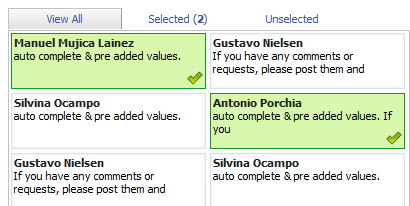
If you have any comments or requests, please post them and I will try to include all the requested features in the upcoming release.
HowTo:
1) HTML stracture:
<ul id="ulid">
<li>regular content <input type="hidden" value="value" /></li>
<li>preselected content <input type="hidden" value="value" checked="checked" /></li>
<li>regular content <input type="hidden" value="value" /></li>
</ul>* This source code was highlighted with Source Code Highlighter.
2) Javascript:
<script type="text/javascript" language="JavaScript">
$(document).ready(function() {
//id(ul id),width,height(element height),row(elements in row)
$.fcbkListSelection(id[ul id],width,height[element height],row[elements in row]);
});
</script>* This source code was highlighted with Source Code Highlighter.
Changelog:
- 1.1: added preselected items
- 1.0: project started
Download: Download fcbkListSelection
Demo: Demo fcbkListSelection
Github: http://github.com/emposha/fcbkListSelection


Enrique
November 23, 2008
Wow, it looks great!
I’ll try it from work next week… will try to integrate into codeIgniter framework
J
December 2, 2008
Can you limit a user to three our four selections?
admin
December 2, 2008
@J: you mean maximum selected numbers?
J
December 4, 2008
Yes, like a user can select up to three or four friends. This way somebody wouldn’t select everybody or everything listed.
ken
December 5, 2008
Hi,
great puglin!
It’s working for me but how do I show a user checked when I first print the selection box.
ie. When I first print the box, how do I show that some users have already been checked?
thanks
Ken
December 8, 2008
looks great. But how do I list users as “selected” when loading all users? Basically, preselect some of the users.
cheers
admin
December 8, 2008
@ken: Not implemented yet, added to todo list.
ken
December 8, 2008
Sorry for the double post.
I made some minor additions to get this to work for me:
in the addToSelected method .. I added this to the corresponding if statment.
obj.find(“input:hidden”).val(0); // remove select
obj.find(“input:hidden”).val(1); // add select
In the bindEventsOnItems method .. I added
obj = $(obj);
selected = obj.find(“input:hidden”).val();
// check to see if the item was clicked.
if (selected == 1){
addToSelected(obj);
obj.toggleClass(“itemselected”);
obj.parents(“li”).toggleClass(“liselected”);
};
It basically check the hidden input for a value of 1 .. if so then add it to selected.
Now .. when you generate your form .. you need only set the value of the hidden input for 1 for it to be selected.
cheers
RS71
December 14, 2008
very nice!
Would be nice to see Ken’s suggestion implemented
cheers
Mohamed
March 10, 2009
I commented position:relative; to got it work on IE7.
there is a bug when the element list is longer than the UL element, we could see the rest of elements outside the UL element (those have to be hidden).
#fcbklist .fcbklist_item
{
background-color:#FFFFFF;
clear:both;
/*position:relative;*/
height:50px;
overflow:hidden;
}
daweb
March 27, 2009
Great work, really!
Is it possible to assign a 100% width to the main window?
daweb
March 27, 2009
And… maybe is there a way to select all items with a single click? Maybe in the future release?
daweb
March 28, 2009
Arhg! Warning. in the .min.js version there’s a console.log(i,randid); not commented
No issue with firebug on, but when it is off the remove features doens’t works (not the visual, the POST array I mean)
Sorry bout my bad english.
Hope will help! 2 hours spent away…
Tommy
June 11, 2009
Sadly, it does’nt work in the noConflict-Mode
Abhay
June 17, 2009
I guess, this plugin works for only once at a time in a page, because of all the generated IDs and stuff. Can you make it more configurable, so that we can use it as a true plugin i.e. repeatedly.
alby82
June 18, 2009
yes! i’ve just implemented the code. to have the correct work we have to eliminate the “console.log(i,randid);” in the fcbklistselection js files. then all games are done. please admin update the js in the downl pack. bye
repeater
June 25, 2009
daweb is right. If you are using Firefox and have firebug turned off, the call to console.log causes the js to fail and items cannot be removed. The problem doesn’t show in Safari (didn’t look at others). The problem exists in BOTH the min and full version of the code. Just remove or comment out the lines.
ben
June 25, 2009
Yes, in the non-minified version, you hvae to remove the line:
console.log(i,randid)
in removeValue().
Otherwise, de-selecting an item removes it visually in the UI but does not actually remove it from the results (note: this problem is apparent in the demo — if you deselect some of the original selections, they are still returned in the output).
Great work though — this saved me a lot of time!
Ben
July 15, 2009
Found a problem where this doesn’t work in IE8 (maybe earlier versions of IE too). Try the demo, and you’ll see that the initially checked values (Silvina and Antonio) do not appear checked in IE, as they do in Firefox and other browsers.
After a few hours of investigation (hope this saves time for a few others), I found the problem. According to HTML standards, the “checked” attribute for input controls in HTML should only apply for radio buttons and checkboxes. Browsers should ignore that attribute for other input controls. However, Firefox and Chrome still pay attention to that attribute, so this widget works. IE does NOT, so it never finds any people as being initially checked.
My workaround was to change the HTML so it doesn’t use the checked attribute. Instead, it sets value=’checked’ if it should be checked and value=” otherwise. Then, in the .js function bindEventsOnItems(), you need to change the “if” test from:
if (obj.children(“input[checked]“).length != 0)
to:
if (obj.children(“input[value='checked']“).length != 0)
Ben
July 15, 2009
Whoops, made a mistake in my last comment. You cannot set the “value” attribute to “checked” or “”, because the widget needs good, unique values in the “value” attribute to identify back to you what the user actually checked.
So, I used the “alt” attribute instead. I set alt=’checked’ if it should be checked and leave it empty otherwise. Then, the if function should be:
if (obj.children(“input[alt='checked']“).length != 0)
Sorry for not fully testing my last comment before submitting it. I think this should work now.